> ## Documentation Index
> Fetch the complete documentation index at: https://apidocs.neetorecord.com/llms.txt
> Use this file to discover all available pages before exploring further.
# Authentication
> Connect as yourself with OAuth, or as the whole workspace with an API key.
The MCP server accepts two kinds of credentials, and the difference is not just
setup. It decides **what the assistant can see**.
| | OAuth | API key |
| -------------------------- | ------------------------------ | -------------------------------------- |
| Scope | The person who approved it | The whole workspace |
| Identity | Tied to a NeetoRecord user | Tied to nothing and nobody |
| Set up by | Pasting the server URL | Pasting a key into a config file |
| Used by | Every client | Every client except Claude and ChatGPT |
| Reaches several workspaces | Yes, tick them while approving | No, one key is one workspace |
| Revoked by | Removing the connector | Revoking the key in workspace settings |
Claude and ChatGPT always use OAuth. Claude Code, Codex, Cursor, Gemini CLI, VS
Code, and Windsurf support both, and you choose by what you put in their config
file: leave the credential out and the client signs you in over OAuth, supply one
and the client reaches the whole workspace. Both routes hit the same server and
expose the same [tools](/mcp/tools).
## OAuth, scoped to you
The assistant acts as the person who approved the connection. Every tool call
runs with that person's permissions: listings and searches come back filtered to
what they can see, and a recording they cannot open is refused rather than
returned.
That makes OAuth the better fit whenever a real person is driving the assistant,
because the blast radius of the connection is the same as the blast radius of
that person's account.
Clients that add a server by URL discover everything else on their own. The
server publishes its OAuth metadata at
`https://connect.neetorecord.com/.well-known/oauth-authorization-server`, and
registers each client automatically, so there is no client ID or secret for you
to create.
| Detail | Value |
| ------------------- | ---------------------------------------------------------------------------------- |
| Grant type | Authorization code with PKCE (`S256`) |
| Scope | `mcp` |
| Client registration | Dynamic, per [RFC 7591](https://datatracker.ietf.org/doc/html/rfc7591) |
| Refresh | Refresh tokens are issued, so the connection survives without you signing in again |
| Revoke | From your assistant, by removing the connector |
What you see when you connect:
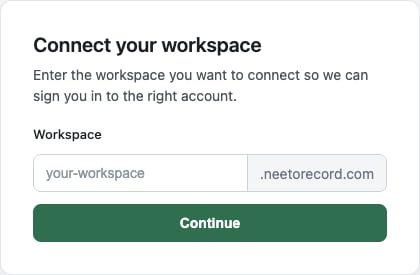
1. **Choose your workspace.** Enter the subdomain of the workspace you want the
assistant to reach. For `acme.neetorecord.com`, enter `acme`.
 2. **Sign in to that workspace**, if you are not signed in already.
3. **Pick the workspaces to connect.** When your email belongs to more than one
workspace, the approval screen lists them all. The one you signed in to is
always included; tick any others the same connection should reach.
4. **Authorize.** The assistant is granted access as you, to each workspace you
ticked.
One OAuth connection can therefore cover several workspaces. Name the one you
mean in a prompt, or ask the assistant to list what it can reach. Every tool
takes an optional `workspace` argument for this.
## API key, scoped to the workspace
An API key carries no identity. Every tool call covers the entire workspace, no
matter whose machine the assistant is running on or who is typing. Two people
sharing one key are indistinguishable to NeetoRecord, and neither is limited to
their own recordings.
That is what you want for automation that has to see everything, and what you do
not want on a laptop belonging to someone who should only see their own work.
The key is the same one the [REST API](/getting-started/authentication) uses,
sent as a bearer token:
```json theme={"system"}
"headers": {
"Authorization": "Bearer YOUR_API_KEY"
}
```
API keys are created in your NeetoRecord workspace settings.
[Learn how to generate your API key here.](https://help.neetorecord.com/articles/api-keys)
A key belongs to one workspace. To let an assistant work with two workspaces,
add the server twice with a different key and a different server name in each
entry.
An API key gives access to every recording in the workspace and is not tied to
a person, so it cannot be traced back to one either. Treat it like a password:
keep it out of shared config files and commits, and revoke it if it leaks.
Prefer OAuth wherever the client supports it.
## How the three interfaces authenticate
| Interface | Credential | Scope | Where it goes |
| ------------------------------------------- | ------------------------------------- | ------------------------------------ | -------------------------------------------------------------------------------------- |
| [REST API](/getting-started/authentication) | API key | Workspace | `X-Api-Key` header on each request. |
| [CLI](/cli/authentication) | Browser sign in, stored per workspace | The signed in user | `~/.config/neetorecord/auth.json`. No API key involved. |
| MCP | OAuth, or an API key | The approving user, or the workspace | Browser approval, or an `Authorization: Bearer` header in the assistant's config file. |
2. **Sign in to that workspace**, if you are not signed in already.
3. **Pick the workspaces to connect.** When your email belongs to more than one
workspace, the approval screen lists them all. The one you signed in to is
always included; tick any others the same connection should reach.
4. **Authorize.** The assistant is granted access as you, to each workspace you
ticked.
One OAuth connection can therefore cover several workspaces. Name the one you
mean in a prompt, or ask the assistant to list what it can reach. Every tool
takes an optional `workspace` argument for this.
## API key, scoped to the workspace
An API key carries no identity. Every tool call covers the entire workspace, no
matter whose machine the assistant is running on or who is typing. Two people
sharing one key are indistinguishable to NeetoRecord, and neither is limited to
their own recordings.
That is what you want for automation that has to see everything, and what you do
not want on a laptop belonging to someone who should only see their own work.
The key is the same one the [REST API](/getting-started/authentication) uses,
sent as a bearer token:
```json theme={"system"}
"headers": {
"Authorization": "Bearer YOUR_API_KEY"
}
```
API keys are created in your NeetoRecord workspace settings.
[Learn how to generate your API key here.](https://help.neetorecord.com/articles/api-keys)
A key belongs to one workspace. To let an assistant work with two workspaces,
add the server twice with a different key and a different server name in each
entry.
An API key gives access to every recording in the workspace and is not tied to
a person, so it cannot be traced back to one either. Treat it like a password:
keep it out of shared config files and commits, and revoke it if it leaks.
Prefer OAuth wherever the client supports it.
## How the three interfaces authenticate
| Interface | Credential | Scope | Where it goes |
| ------------------------------------------- | ------------------------------------- | ------------------------------------ | -------------------------------------------------------------------------------------- |
| [REST API](/getting-started/authentication) | API key | Workspace | `X-Api-Key` header on each request. |
| [CLI](/cli/authentication) | Browser sign in, stored per workspace | The signed in user | `~/.config/neetorecord/auth.json`. No API key involved. |
| MCP | OAuth, or an API key | The approving user, or the workspace | Browser approval, or an `Authorization: Bearer` header in the assistant's config file. |